Setting up a business server should be exciting. You are building the backbone that will run your files, your applications, your email, and your entire network. But the moment you start researching Windows Server 2025 Standard, the excitement fades. Suddenly you are drowning in terms like “per-core licensing,” “CALs,” “evaluation SKUs,” and “16-core minimums,” none of which anyone bothered to explain.
Here is the honest truth: Windows Server licensing is not actually that complicated once someone breaks it down in plain language. The confusion is what leads people to overpay, buy the wrong edition, or get stuck with an evaluation copy they do not know how to activate.
Table of Contents
This 2026 guide fixes that. We will explain what Microsoft Windows Server 2025 Standard is, what it really costs, how it compares to Essentials and Datacenter, where to get the ISO, and how to turn a free trial into a fully licensed server. No jargon left unexplained, no steps skipped.
The Problem: Where Beginners Go Wrong
Before the solutions, it helps to know the three traps that catch most first-time buyers.
The first trap is assuming you license the server itself. You do not. You license the physical processor cores inside it. This surprises people whose costs end up higher than expected because their server has more cores than they realized.
The second trap is confusing the editions. Many people assume Essentials is just a “lite Standard” and Datacenter is “Standard but bigger.” The reality is more nuanced, and picking wrong means either missing features you need or paying for capacity you will never use.
The third trap is the evaluation version. Downloading the free trial is smart, but many beginners do not know that turning it into a paid, permanent install requires a specific command not a simple key entry in Settings. Get stuck here and your server can stop working when the trial expires.
Let us solve all three.
What Is Microsoft Windows Server 2025 Standard?
Microsoft Windows Server 2025 Standard is the middle tier of Microsoft’s server operating system lineup. It is built for small and mid-sized organizations that run physical servers or modest virtual environments. It delivers every essential server role you would expect: Active Directory for managing users and computers, file and storage services, DNS and DHCP for networking, Remote Desktop Services, print services, and web hosting through IIS.
Windows Server 2025 became generally available on November 1, 2024, and as a Long-Term Servicing Channel release, it enjoys a full decade of support mainstream support through October 2029 and extended support through October 2034. That long lifespan makes it a safe, future-proof foundation for any business.
Standard is the most popular edition because it includes the complete server toolset without the premium price of Datacenter’s unlimited virtualization. For most companies, it is the natural starting point.
What’s New in Windows Server 2025, Standard
This generation brings meaningful upgrades over Windows Server 2022 that are worth understanding.
Improved Security
Windows Server 2025 Standard includes a next-generation version of Active Directory with better security and scalability, LDAP encryption enabled by default, and a hardened security baseline with drift protection you can configure from the very start. These changes make the platform more resistant to modern cyberattacks straight out of the box.
Faster Storage and Networking
SMB over QUIC is now available in all editions, including Standard. This lets users securely access file shares over the internet without needing a VPN a genuinely useful feature for remote and hybrid teams. Storage performance has also improved, making Windows Server 2025 an even stronger platform for running SQL Server workloads.
Better Hybrid Cloud Integration
Tighter Azure Arc integration means you can manage your on-premises Windows Server 2025 Standard alongside cloud resources from a single console, bridging the gap between your local infrastructure and Azure.
A More Modern Experience
The Desktop Experience installation now brings a consistent, up-to-date interface, and even includes conveniences like Wi-Fi and Bluetooth support that previous server versions lacked.
Windows Server 2025 Essentials vs Standard
This is where a lot of beginners make their first mistake, so let us be crystal clear.
Windows Server 2025 Essentials is now sold exclusively through OEM channels, which usually means it comes pre-installed on server hardware you buy from a manufacturer. You cannot easily purchase it as a standalone retail product anymore. It is aimed at very small businesses and carries strict hardware limits: a single processor, a maximum of 10 CPU cores, and up to 128 GB of RAM. It also cannot function as a full Remote Desktop terminal server, and certain roles like Rights Management Services are not permitted.
Windows Server 2025 Standard, by contrast, is far more flexible. It supports much more powerful hardware, allows the full range of server roles without the Essentials restrictions, and includes the right to run up to 2 virtual machines plus the physical host on each licensed server.
The bottom line on windows server 2025 essentials vs standard: if you are a micro-business buying a small pre-configured server that happens to include Essentials, it may serve you fine. But if you need room to grow, want full Remote Desktop Services, or plan to run virtual machines, Standard is the clear and safer choice.
Windows Server 2025 Datacenter vs Standard
Once your needs grow, the next decision is Standard versus Datacenter. The difference comes down mainly to virtualization.
Windows Server 2025 Standard grants rights to run 2 virtual machines per licensed server. Windows Server 2025 Datacenter grants unlimited virtual machines on that same licensed hardware. That single distinction drives the entire decision.
Datacenter also unlocks advanced features that Standard does not include: Storage Spaces Direct for building software-defined storage from local drives, Shielded Virtual Machines for protecting VMs in sensitive or multi-tenant environments, Software-Defined Networking for advanced virtual network control, and hotpatching, which applies many security updates without requiring a reboot.
So how do you choose on windows server 2025 datacenter vs standard? Use virtual machine density as your guide. If a physical host runs six or fewer VMs, Standard — licensed across all its cores is almost always the cheaper route. Once a single host regularly runs a dozen or more VMs, Datacenter’s unlimited virtualization starts saving you money and becomes the smarter buy. Both editions share the same underlying operating system and security features; you are really paying for virtualization scale.
Windows Server 2025 Standard Edition Price
Now for the question everyone asks. Let us break down the windows server 2025 standard edition price clearly.
Licensing is core-based. You license every physical core in your server, subject to two minimums that always apply: at least 8 cores per physical processor and at least 16 cores per physical server, whichever is greater. Even a small server with just 4 cores must be licensed for the full 16-core minimum.
According to published reference pricing, Windows Server 2025 Standard costs approximately $1,176 USD for a base 16-core license pack. For comparison, Datacenter runs approximately $6,771 USD for the same 16 cores. If your server has more than 16 cores, you buy additional core packs (available in 2-core and larger increments) to cover every physical core.
Worked example: Imagine a server with two 10-core processors, for 20 cores total. You must license all 20. That means one 16-core base pack plus additional 2-core packs to cover the remaining 4 cores. You cannot license just 16 and ignore the rest.
Two more cost factors matter. First, Client Access Licenses (CALs) are required for every user or device that connects to the server, and they are billed separately from the core licenses. If you use Remote Desktop Services, you also need separate RDS CALs. Second, CALs are version-specific your old Windows Server 2022 CALs will not authorize access to a 2025 server, so budget for new ones. Actual prices vary by region and reseller, and volume licensing through a Cloud Solution Provider often beats list price, so always request a proper quote.
How to Get the Windows Server 2025 Standard ISO Download
Here is the step-by-step process to obtain your installation media.
Step 1: If you have already purchased a license through volume licensing or an authorized reseller, sign in to your licensing portal. Your windows server 2025 standard iso download link and product key will be available there together.
Step 2: If you want to test before buying, visit the Microsoft Evaluation Center and locate Windows Server 2025. Microsoft provides a free 180-day evaluation ISO that is functionally identical to the paid version.
Step 3: Select your preferred language and download the ISO file to your management computer or virtualization host.
Step 4: Mount the ISO on your physical machine or attach it to a new virtual machine, then boot from it.
Step 5: During setup, choose your edition (Standard) and your installation type “Desktop Experience” for a full graphical interface, or “Server Core” for a lighter, more secure command-line install.
Step 6: Complete the setup wizard and perform your initial configuration, such as setting the administrator password and network settings.
How to Convert Windows Server 2025 Evaluation to Standard
This is one of the most common sticking points, so here is exactly how to convert windows server 2025 evaluation to standard without reinstalling anything.
Step 1: Sign in to your evaluation server as an administrator.
Step 2: Open Command Prompt or PowerShell as Administrator (right-click the Start button and choose the admin option).
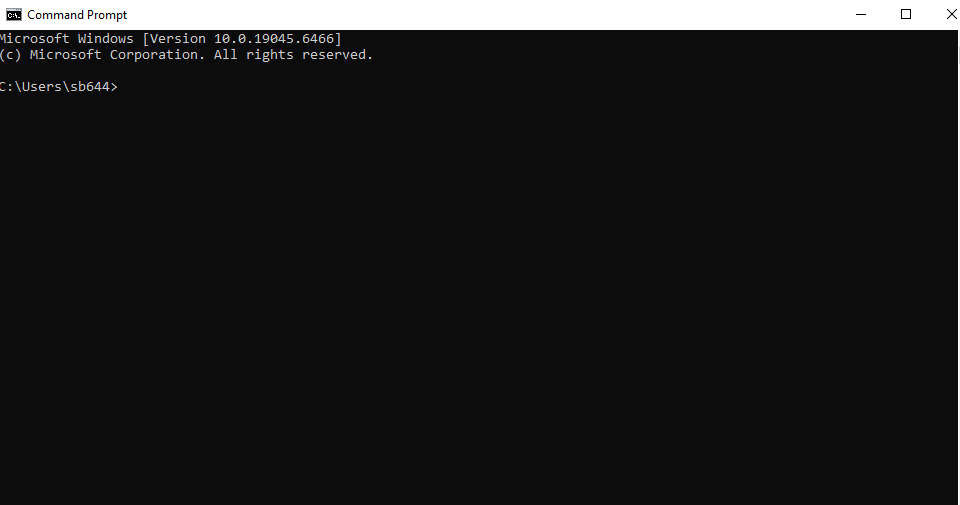
Step 3: Confirm you are running an evaluation edition by typing:
DISM /online /Get-CurrentEdition
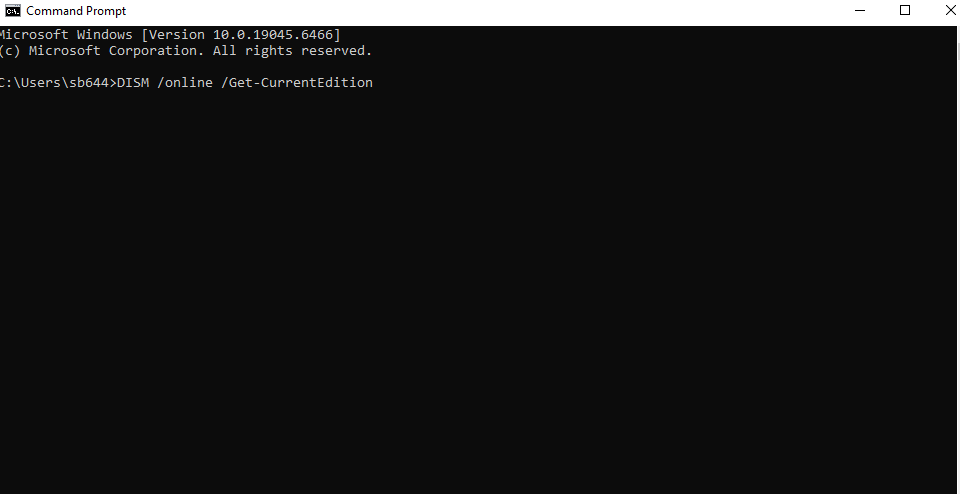
The result will show something ending in “Eval,” such as “ServerStandardEval,” confirming the trial SKU.
Step 4: Run the conversion command, inserting your genuine purchased Standard key:
DISM /online /Set-Edition:ServerStandard /ProductKey:XXXXX-XXXXX-XXXXX-XXXXX-XXXXX /AcceptEula
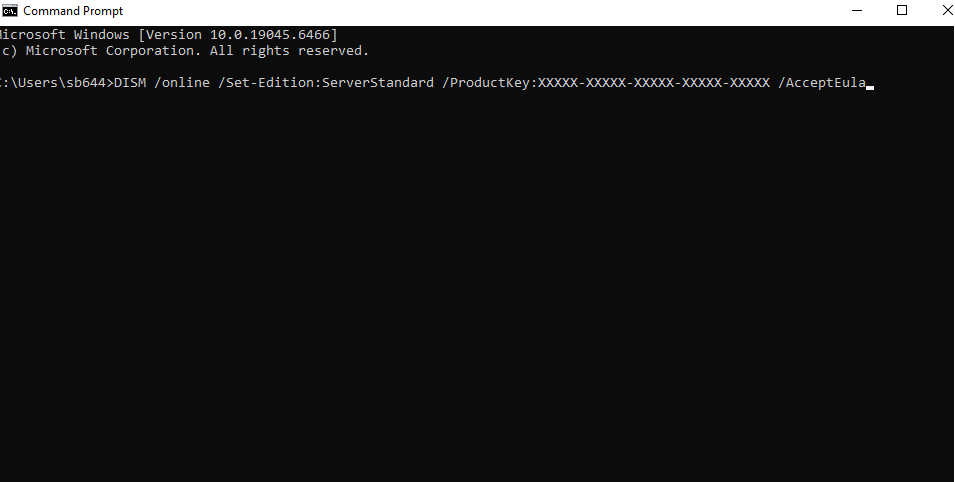
Step 5: Replace the Xs with your real 25-character key and press Enter. The conversion takes a few minutes to process.
Step 6: Restart the server when prompted.
Step 7: After it reboots, confirm activation by typing:
slmgr /xpr
You should see that the machine is permanently activated. Your temporary trial is now a fully licensed, permanent Windows Server 2025 Standard installation with all your settings and data intact.
Tip: Complete the windows server 2025 evaluation to standard conversion well before the 180-day trial ends. Letting the evaluation fully expire makes conversion more complicated and can leave the server shutting down periodically until it is licensed.
FAQ Section
How much does Windows Server 2025 Standard cost?
The windows server 2025 standard edition price is approximately $1,176 USD for a base 16-core license pack, based on published reference pricing. Servers with more than 16 cores require additional core packs. Client Access Licenses are a separate cost, and actual pricing varies by region and reseller.
What’s the difference between Windows Server 2025 Essentials and Standard?
Essentials is OEM-only and limited to one processor, 10 cores, and 128 GB of RAM, with restrictions on Remote Desktop Services. Standard supports far more powerful hardware, allows all standard server roles, and includes rights to run 2 virtual machines per licensed server. Standard is the better choice for any growing business.
Should I choose Datacenter or Standard?
For windows server 2025 datacenter vs standard, use VM count as your guide. Standard (with 2-VM rights) is cheaper for hosts running six or fewer virtual machines. Datacenter, with unlimited VMs plus features like Storage Spaces Direct and hotpatching, becomes worthwhile once you run a dozen or more VMs per host.
Where can I download the Windows Server 2025 Standard ISO?
If you own a license, the windows server 2025 standard iso download is in your volume licensing or reseller portal alongside your key. To test first, download the free 180-day evaluation ISO from Microsoft’s Evaluation Center, which you can later convert to a licensed copy.
How do I convert the evaluation version to a full license?
To convert windows server 2025 evaluation to standard, open an administrator command prompt and run DISM /online /Set-Edition:ServerStandard /ProductKey:[your key] /AcceptEula, then restart. This upgrades the trial to a fully licensed edition in place, with no reinstall and no data loss.
Conclusion
Windows Server 2025 Standard is the right foundation for the majority of businesses in 2026. It delivers the full set of server roles, modern security improvements like next-generation Active Directory and default LDAP encryption, useful features such as SMB over QUIC, and a decade of support all without paying for unlimited virtualization you may never need.
The key to a smooth experience is understanding the fundamentals before you commit. Know that licensing is per physical core with a 16-core minimum. Know how Standard differs from both Essentials and Datacenter so you buy exactly what fits. And know that a free evaluation ISO can be converted into a permanent, licensed install with a single command.
Take it one step at a time: download the evaluation, test your setup, count your cores, choose your edition, and convert when you are ready. Do that, and Microsoft Windows Server 2025 Standard will reward you with a stable, secure, and well-supported platform that grows right alongside your business.