
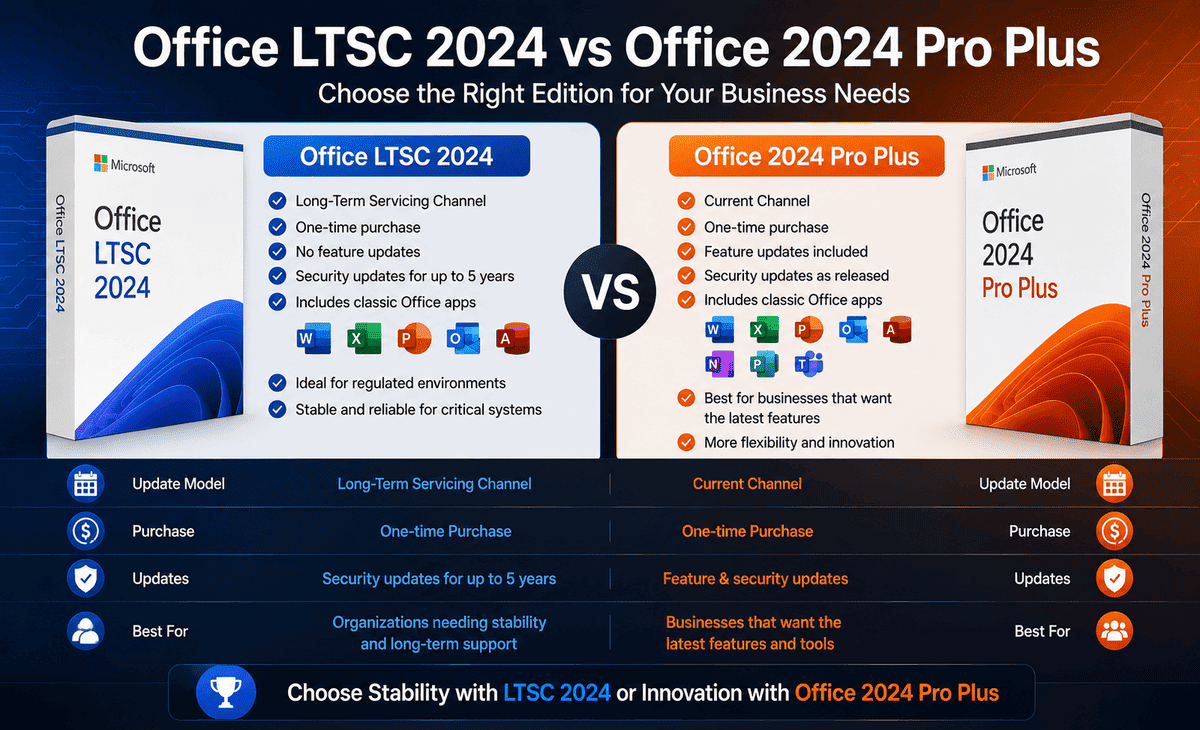
If you have been shopping for Microsoft Office recently, you may have stumbled across two confusingly similar names: Office LTSC 2024 and Office 2024 Pro Plus. They look almost identical at first glance, share many of the same applications, and both promise a one-time purchase. So what is the actual difference, and which one should you buy?
This confusion trips up a lot of people. Some buyers end up with the wrong version, only to realize later that it does not work the way they expected or that it was meant for large organizations, not individuals. Choosing incorrectly can mean paying for features you cannot use or missing updates you actually need.
Table of Contents
This complete comparison guide clears up the confusion in simple language. We will explain what each version is, how they differ in features, licensing, updates, and pricing, and help you figure out exactly which one fits your situation. By the end, you will know whether Office LTSC 2024 or Office 2024 Pro Plus is right for you.
What Is Office LTSC 2024?
Office LTSC 2024 stands for “Long-Term Servicing Channel.” It is a standalone, on-premises version of Microsoft Office designed for organizations that need stability and predictability rather than constant change.
The defining feature of Office LTSC 2024 is its fixed feature set. Unlike subscription products, it provides the same features it launched with for its entire lifecycle. Microsoft delivers only security updates and stability fixes no new features are added over time. This makes it ideal for environments where frequent software changes are not acceptable.
LTSC is built for specific use cases: industries like healthcare, finance, and government where system stability is critical, disconnected or restricted environments without reliable internet, and specialized machines like medical equipment or manufacturing terminals that should never change once configured.
Office LTSC Professional Plus 2024 includes Word, Excel, PowerPoint, Outlook, OneNote, and Access. Skype for Business is available as an optional install during setup. It is offered through volume licensing, which means it is primarily intended for organizations buying multiple licenses, with a minimum unit requirement for initial purchase.
It comes with five years of support and avoids any feature updates throughout that period.
What Is Office 2024 Pro Plus?
Office 2024 Pro Plus is the version most individuals and businesses think of when they picture buying Office. It is the standard professional edition of Microsoft’s 2024 productivity suite, designed for general users, professionals, and businesses who want the complete set of Office applications.
Office 2024 Pro Plus includes Word, Excel, PowerPoint, Outlook, OneNote, Access, and Publisher. It delivers the full modern Office experience with the latest interface design and the newest functions.
Like LTSC, it is a perpetual license a one-time purchase rather than a subscription. You buy it once, activate it with your Office 2024 Pro Plus Key, and own it permanently. It is the go-to choice for users who want the most complete and capable version of standalone Office without committing to a Microsoft 365 subscription.
Technically, “Pro Plus” is also a volume-licensed product line, which is why the official volume version carries the “LTSC Professional Plus 2024” name. In everyday usage, though, retailers and users refer to “Office 2024 Pro Plus” as the full-featured professional desktop suite activated with an Office 2024 Pro Plus Key.
Feature Comparison: Office LTSC 2024 vs Office 2024 Pro Plus
Let us compare the two across the factors that matter most.
Applications Included
Both versions include the core professional applications: Word, Excel, PowerPoint, Outlook, OneNote, and Access. The Pro Plus desktop edition typically also includes Publisher, while the LTSC editions focus on the business-essential apps. Access is not available on macOS for either version.
For most users, the application lineup is similar enough that this is not the deciding factor.
Updates and New Features
This is the biggest practical difference. Office LTSC 2024 receives security and stability updates only; it never gets new features after launch. The feature set is frozen in time exactly as it was on release day.
Office 2024 Pro Plus, in its standard form, is designed to receive security patches and performance improvements, giving general users a more current experience. If staying current matters to you, this difference is significant.
Licensing Model
Office LTSC 2024 is strictly a volume-licensed product with a minimum unit requirement, built for organizational deployment by IT administrators. It is not intended for individual consumers buying a single copy.
Office 2024 Pro Plus is widely available as a one-time purchase that individuals and small businesses can buy and activate with a single Office 2024 Pro Plus Key on their device.
Cloud and Connectivity
Office LTSC 2024 is built for disconnected, on-premises environments and does not include cloud-backed features. Office 2024 Pro Plus offers better integration with OneDrive and cloud-connected functionality for users who work online and across devices.
Target User
LTSC is for IT departments managing stable, controlled, or offline environments. Pro Plus is for everyday professionals, businesses, and power users who want the full standard Office experience.
Quick Comparison Table
| Factor | Office LTSC 2024 | Office 2024 Pro Plus |
|---|---|---|
| Purchase Type | One-time (volume) | One-time (perpetual) |
| New Features After Launch | No | Limited improvements |
| Updates | Security & stability only | Security & performance |
| Cloud Integration | Minimal / none | Better OneDrive integration |
| Licensing | Volume (minimum units) | Single-key activation available |
| Best For | IT-managed, stable, offline setups | Individuals, professionals, businesses |
| Apps | Word, Excel, PowerPoint, Outlook, OneNote, Access | Word, Excel, PowerPoint, Outlook, OneNote, Access, Publisher |
| Support Length | 5 years | 5 years |
Step-by-Step: How to Choose the Right Version
Follow these steps to make a confident decision.
Step 1 — Identify who you are buying for. Are you an individual or small business buying one or a few copies? Lean toward Office 2024 Pro Plus. Are you an IT admin deploying Office across dozens or hundreds of machines in a controlled environment? Office LTSC 2024 is built for you.
Step 2 — Consider your update preferences. Do you want a frozen, never-changing feature set for maximum stability? Choose LTSC. Do you prefer a more current experience with ongoing improvements? Choose Pro Plus.
Step 3 — Evaluate your environment. Are your machines offline, restricted, or mission-critical (like medical or financial terminals)? LTSC’s locked-in stability is a major advantage. Are your machines connected to the internet and used for everyday productivity? Pro Plus fits better.
Step 4 — Check how you will activate. If you are buying a single license to activate with one Office 2024 Pro Plus Key, the Pro Plus route is the practical choice. Volume licensing through LTSC requires meeting minimum unit requirements and is managed differently.
Step 5 — Match to your budget and goals. Both are one-time purchases, but LTSC volume licensing is structured for organizations. For most home and small business users, Office 2024 Pro Plus offers the best balance of features, flexibility, and value.
FAQ
Is Office LTSC 2024 the same as Office 2024 Pro Plus?
They are closely related but not identical. The official volume product is called “Office LTSC Professional Plus 2024.” The main differences are that LTSC is volume-licensed for organizations, receives security-only updates with no new features, and is built for stable or offline environments. Office 2024 Pro Plus, as commonly sold, is the full professional desktop suite that individuals and businesses activate with a single key.
Can I buy Office LTSC 2024 as an individual?
Office LTSC 2024 is designed for volume licensing with minimum unit requirements, meaning it is intended for organizations rather than individual consumers. If you are an individual, Office 2024 Pro Plus is the more appropriate choice and is easier to purchase and activate with a single Office 2024 Pro Plus Key.
Does Office 2024 Pro Plus include Copilot AI features?
No. Neither Office 2024 Pro Plus nor Office LTSC 2024 includes Copilot AI features. Those are part of specific Microsoft 365 subscription plans. Both 2024 perpetual versions are standalone, one-time-purchase products without cloud-based AI tools.
How long is Office LTSC 2024 supported?
Office LTSC 2024 comes with five years of support. During this period, it receives security updates and stability fixes only — no new features are added. This long, predictable support window is one of the main reasons organizations choose the LTSC version.
Which version gets new features over time?
Office LTSC 2024 never receives new features after launch; its feature set is frozen. Office 2024 Pro Plus is designed to receive ongoing security and performance improvements, giving general users a more current experience. If you want access to evolving tools, the standard Pro Plus path is better, though for continuous new features a Microsoft 365 subscription is the only option.
Conclusion
Choosing between Office LTSC 2024 and Office 2024 Pro Plus comes down to who you are and how you work.
Office LTSC 2024 is the right choice for organizations and IT departments that need rock-solid stability, a frozen feature set, security-only updates, and volume deployment across controlled or offline environments. It is purpose-built for healthcare, finance, government, and mission-critical systems where predictability matters more than the newest features.
Office 2024 Pro Plus is the right choice for individuals, professionals, and businesses who want the complete, modern Office experience as a one-time purchase. With easy single-key activation using your Office 2024 Pro Plus Key, the full application lineup, and better cloud integration, it is the practical pick for the vast majority of everyday users.
Before you buy, honestly assess your environment, your update preferences, and whether you are purchasing for yourself or an organization. Always buy from Microsoft or an authorized reseller to guarantee a genuine license. Make the right match, and you will enjoy a reliable, powerful Office suite that serves you well for years to come.









