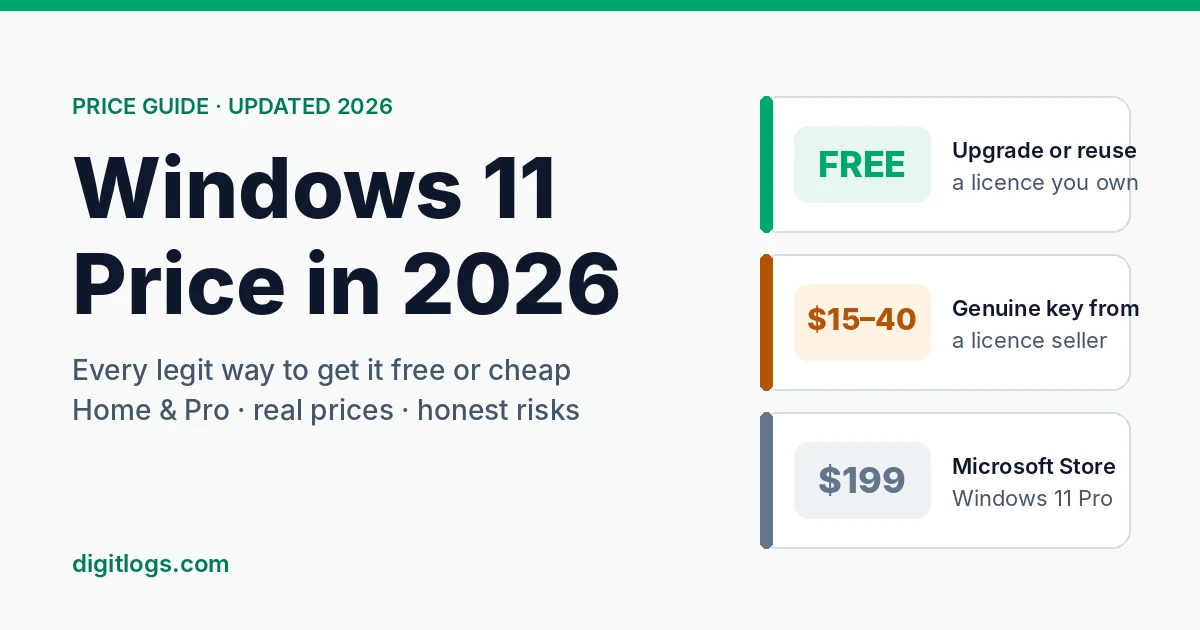
Windows 11 has three price tags depending on where you look. Microsoft charges about $199 for Pro. Licence shops sell Pro keys for $20 to $40. And a quick search promises “Windows 11 Pro free” with a download link and a mystery tool.
Only some of those are real options. This guide lays out the actual Windows 11 price in 2026 for Home and Pro, every legitimate way to pay nothing, the cheapest safe way to get Pro, and what each route really costs once you factor in your next PC.
If you’re still on Windows 10, the clock matters too. Microsoft’s free security updates for home users now run until 12 October 2027, which buys time, but not forever.
Quick answer
- Official price (US): about $139 for Home and $199 for Pro; upgrading Home to Pro inside Windows costs about $99.
- Best free option: upgrade a Windows 10 PC you already own, or reuse a retail key from an old PC.
- Cheapest paid option: a key from a reputable licence seller, typically $15–40. You can buy Windows 11 Pro here.
- For businesses: per-PC Pro keys for small, stable teams; a Microsoft 365 business plan once you need central management.
How much does Windows 11 cost in 2026?
Here’s what Microsoft itself charges for a Windows 11 licence; you can confirm the US price on the Windows 11 Pro page on Microsoft Store. These are the “full price” numbers everything else in this guide gets compared against.
A few things jump out:
- Pro costs about $60 more than Home in the US, but in the UK the gap is £100. Where you live changes the maths.
- The upgrade is cheaper than buying Pro outright, but only if you already have an activated Home licence.
- In India, retail shops commonly list Pro at around ₹14,000–16,000 and Home at around ₹8,000–9,500. That’s the market, not Microsoft’s own price, but it shows how much people end up paying in-store.
These prices have hardly moved since Windows 11 launched in 2021. That’s useful context: if Microsoft’s own price hasn’t dropped, a site offering Pro for $3 isn’t selling the same thing at a discount. More on that below.
Not sure whether you need Pro at all? Our Windows 11 Home vs Pro breakdown covers it in two minutes. For everyday browsing, gaming and Office work, a Windows 11 Home licence is enough.
Every way to get Windows 11, from free to full price
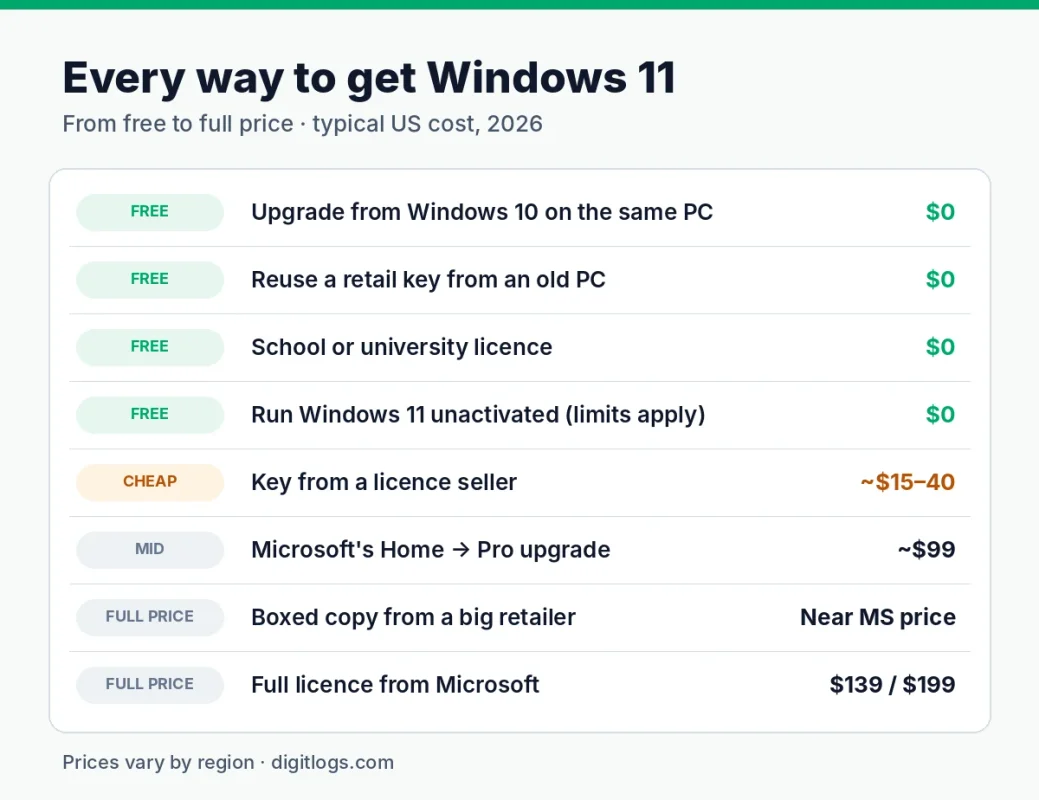
There are eight realistic routes. Here they are side by side, cheapest first.
| Route | Typical cost (US) | Home or Pro | Permanent? | The catch |
|---|---|---|---|---|
| Upgrade from Windows 10 on the same PC | Free | Same edition you had | Yes | PC must meet Windows 11 requirements |
| Reuse a retail key from an old PC | Free | Same edition as the key | Yes | Must be retail and removed from the old PC |
| School or university licence | Free | Education (has Pro’s features) | While you’re eligible | Only for current students and staff |
| Run Windows 11 unactivated | Free | Any | It runs, but stays unactivated | Watermark, locked personalisation, not for business use |
| Key from a licence reseller | ~$15–40 | Home or Pro | Yes | Quality depends entirely on the seller |
| Microsoft’s Home → Pro upgrade | ~$99 | Pro | Yes | Needs an activated Home PC first |
| Boxed copy from a big retailer | Close to Microsoft’s price | Home or Pro | Yes | Small saving, sometimes OEM-only |
| Full licence from Microsoft | ~$139 Home / ~$199 Pro | Home or Pro | Yes, and transferable | The most expensive way |
The cheapest row isn’t always the cheapest choice. A $20 OEM key that dies with your motherboard can cost more over five years than a transferable licence you buy once. We’ll do that maths further down.
Can you get Windows 11 Pro for free? The legitimate routes
Yes, in more situations than most people realise. The searches for “W11 Pro free” are full of sketchy tools, but these are the free routes that actually hold up.
1. Upgrade from Windows 10 Pro
If your PC runs a genuine copy of Windows 10 Pro and meets Windows 11’s requirements, the upgrade to Windows 11 Pro is free. Your licence carries over automatically. You’ll find it in Settings → Update & Security → Windows Update, or you can download Windows 11 from Microsoft and use the Installation Assistant. Our step-by-step upgrade and activation guide walks through it.
The same applies to Windows 10 Home: it upgrades free to Windows 11 Home.
2. Reuse a retail key from an old PC
If you bought Windows 10 or 11 Pro as a retail licence for a computer you’ve retired, that key can go on your new machine. Deactivate or wipe the old PC first; one licence covers one PC at a time.
OEM keys are different. If the key came pre-installed on a Dell or HP, it’s tied to that machine and usually won’t activate anywhere else.
3. Through your school or university
Many universities and colleges give students Windows 11 Education free through a student software portal. Education includes everything in Pro (BitLocker, Remote Desktop, Hyper-V). Check your institution’s IT or software download page before you spend anything.
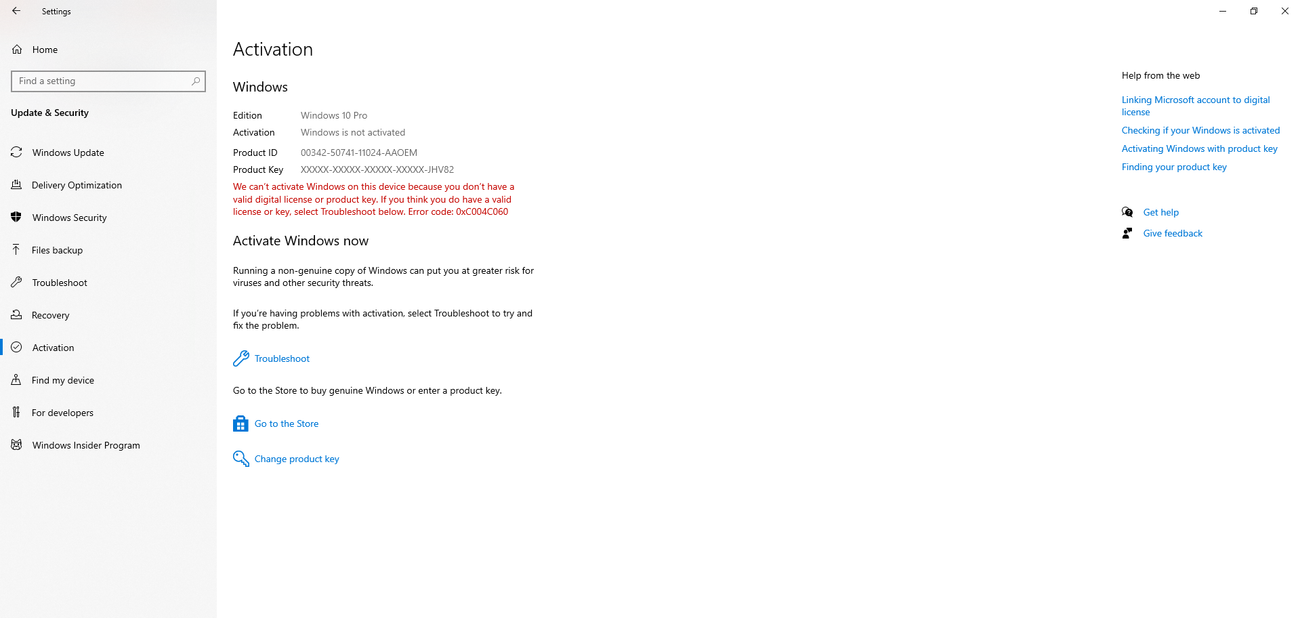
4. Run Windows 11 unactivated
You can download Windows 11 from Microsoft, click “I don’t have a product key” during setup, choose Pro, and use it. It keeps working and keeps getting security updates.
What you give up:
- An “Activate Windows” watermark in the corner of the screen.
- Personalisation settings are locked (wallpaper, colours, themes).
- No help from Microsoft support.
- It isn’t properly licensed, so it’s not an option for any business or client work.
It’s fine for a test machine or a spare PC. It’s not a long-term setup for the laptop you earn money on.
5. Evaluation builds for testing
Microsoft offers a time-limited Windows 11 Enterprise evaluation for IT pros. They’re free and fully featured for 90 days, which makes them perfect for a virtual machine or testing software before a rollout. They’re not for everyday use, and they can’t be converted into a permanent licence. Microsoft warns that once an evaluation expires, the desktop turns black and the PC shuts down every hour, so never install one on a machine you depend on.
Why “free Windows 11 Pro keys” and activators aren’t free
The free keys you see in list articles are keys Microsoft itself publishes for installation and volume activation. They let you install Pro but never activate it; we explain why generic keys don’t activate.
The other “free” route is an activator tool or a pre-cracked ISO. These come with real costs:
- Malware. Activators are one of the most common ways ransomware and password stealers get onto home PCs.
- Broken updates. Tampered system files can fail future Windows updates.
- Business risk. For a freelancer or small business, an unlicensed PC holding client data is a liability you don’t want to explain.
Compared with a properly licensed key at $20–40, “free” turns out to be the most expensive option on this page.
The cheapest way to get Windows 11 Pro for your situation
The right answer depends on what you’re starting with. Find your row.
| You have… | Cheapest legit route to Pro | Approx. cost (US) |
|---|---|---|
| A Windows 10 Pro PC that meets the requirements | Free upgrade through Windows Update | $0 |
| A retail Pro key from a retired PC | Reuse it on the new machine | $0 |
| A Windows 10 Home PC | Upgrade free to Windows 11 Home, then enter a Pro key | Price of one Pro key |
| A laptop that came with Windows 11 Home | Enter a Pro key in Settings; no reinstall | Price of one Pro key (or ~$99 via Microsoft) |
| A new PC you built, with no licence | Buy a Pro key and enter it during setup | Price of one Pro key |
| You’re about to buy a laptop | Compare the price of the Pro model with the Home model + a Pro key | Varies by brand |
Example: a freelancer with a Home laptop
Say you’re a freelance designer in the UK. Your new laptop shipped with Windows 11 Home, and a client contract now requires encrypted storage, so you need BitLocker, which means Pro.
- Microsoft’s route: Settings → System → Activation → Upgrade your edition. About £119.99.
- Reseller route: a Pro key from a registered licence seller, entered on the same screen. Typically a fraction of that price.
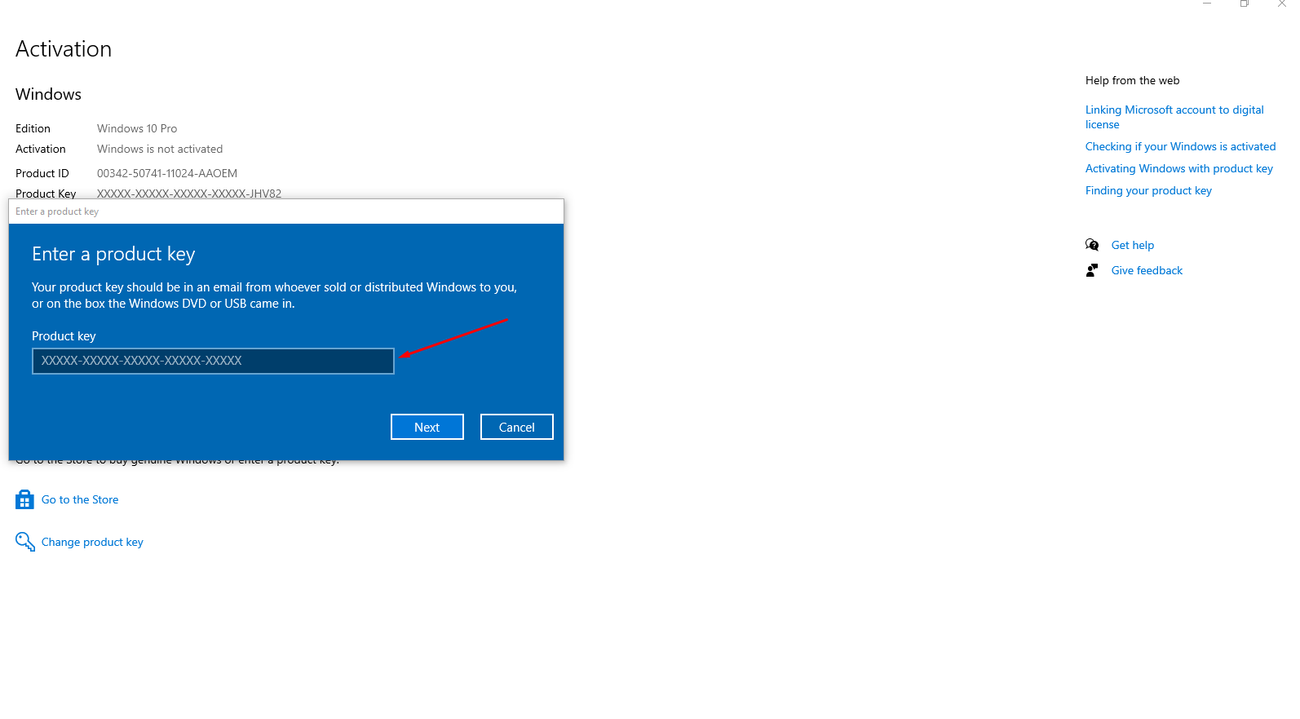
Both routes keep all your files and apps, and both take about ten minutes. The difference is only where you buy the licence and what you pay.
When buying a new laptop, check the price gap between the Home and Pro models of the same machine. Brands sometimes charge more for the Pro version than a separate Pro key would cost, so the cheaper path can be the Home model plus a cheap Windows 11 Pro key.
Cheap Windows 11 keys: are they legit?
A cheap Windows 11 key can be perfectly genuine, or it can stop working three months later. The price alone won’t tell you which. Where it came from, and who’s selling it, will.
Where lower-priced keys come from
Most legitimate low-cost keys are OEM or surplus retail licences: stock that distributors, system builders and businesses bought in bulk and didn’t use. Resellers buy that stock at a lower per-key cost and skip Microsoft’s retail margin and packaging. The Windows you install is exactly the same.
The keys to avoid are leaked volume keys. These are meant for one company’s internal network, get resold by the hundred, and are eventually blocked by Microsoft. That’s the usual story behind “it activated, then stopped working.” They tend to be the very cheapest listings, often under $10.
Marketplace vs single store vs Microsoft
| Marketplace | Single licence store | Microsoft | |
|---|---|---|---|
| Who sells the key | Many independent merchants | One company | Microsoft |
| Price | Lowest, varies by merchant | Low to mid | Highest |
| If the key fails | Raise a case with the platform, which chases the merchant | Contact the store directly | Microsoft support |
| What to check | The individual merchant’s rating and the platform’s buyer protection | Company registration, written guarantee | Nothing; it’s the source |
Neither model is automatically better. What matters is that someone specific is accountable if the key fails, and that you know who that is before you pay.
Online activation vs phone activation
A good key activates online in under a minute. Some cheap listings warn you may need to activate by phone, which means calling Microsoft and explaining where the key came from. Treat “phone activation may be required” as a yellow flag and pay a little more for a key that activates online.
Quick checks before you buy
- A registered company name and address on the site.
- A written replacement policy, visible before checkout.
- Delivery by email with an invoice.
- A real support contact.
- No “activator” tools or scripts bundled with the key, ever.
Our full checklist, with red and green flags, is in the full guide to licence types .
How Digitlogs handles it
DIGITLOGS LTD, a company registered in England and Wales. Windows 11 Pro Keys are delivered by email Instant, and if a key ever fails to activate, replacement guarantee. You can see exactly how our keys are delivered and replaced before you order.
The real cost of Windows 11 over 3–5 years
Sticker price is only half the story. The other half is what happens when you replace your PC or its motherboard, which most people do at least once in five years.
Assumptions for the table: Windows 11 Pro, US prices, and one PC replacement in five years.
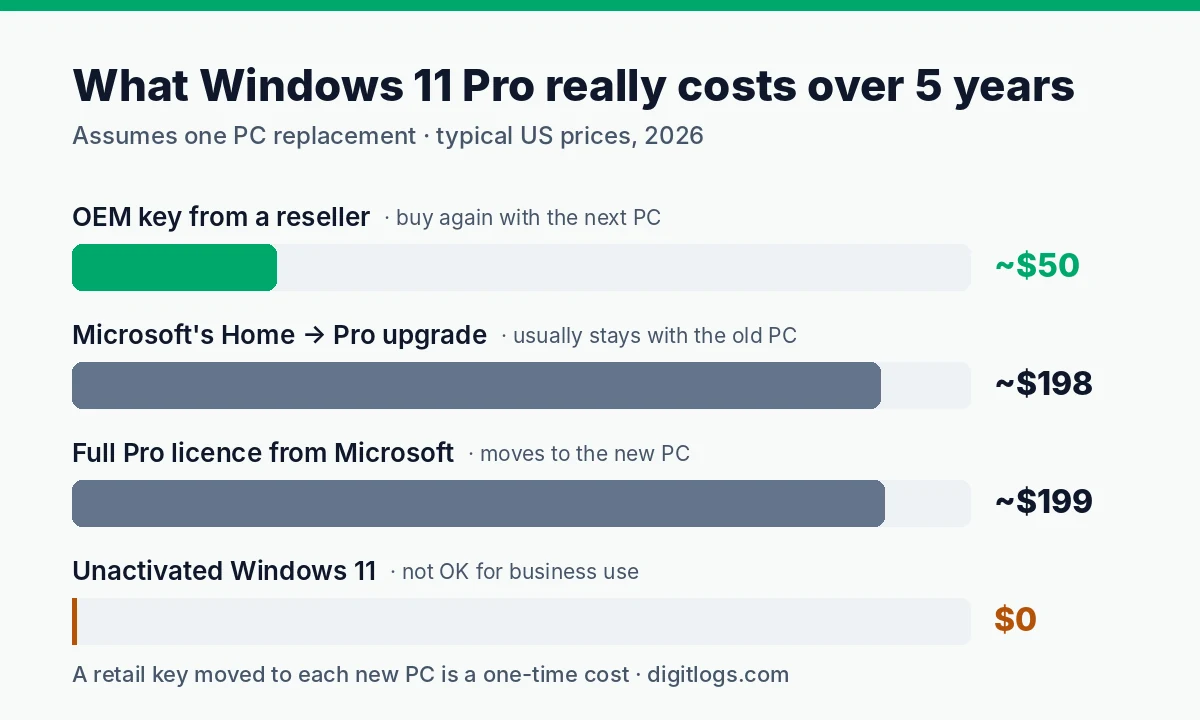
What this shows:
- If you replace PCs often, a transferable licence wins. A retail key you move from machine to machine is a one-time cost.
- If you keep one PC for five years or more, OEM is the best value. You only pay once anyway.
- The in-Settings upgrade is convenient but rarely the cheapest, especially once you count the next PC.
- Unactivated looks free but can’t be used for client or business work, and you lose personalisation for the whole five years.
For a deeper look at how OEM and retail keys differ, see OEM vs retail keys.
Windows 11 pricing for small businesses and startups
For a business, the question isn’t just “what’s cheapest?” It’s “what’s cheapest that we can prove is licensed, and that still makes sense when someone joins or leaves?”
Example: a 5-person startup
Five new laptops, all shipped with Windows 11 Home. The team needs Pro for BitLocker and Remote Desktop.
| Option | What it costs | Good fit when |
|---|---|---|
| 5 × Pro upgrade via Microsoft | ~5 × $99 = ~$495 | You want everything bought directly from Microsoft |
| 5 × Pro keys from a licence seller | 5 × $100 | Small, stable team; you manage the PCs yourselves |
Per-PC keys or a subscription?
- Per-PC Pro keys are a one-time cost. They suit teams of 1–10 people who keep their laptops for years and don’t need IT to manage devices remotely.
- A Microsoft 365 business plan costs more over time but bundles Office, email and device management. It starts to make sense once staff turnover or security policies make central control worth paying for.
If you go per-PC, the same purchase is a good moment to sort out Office too. Office 2024 Professional Plus is a one-time licence that fits the same “buy once, keep it” approach.
Keep a licence register
Whatever you buy, keep the invoices and a simple spreadsheet: which key is on which laptop, who uses it, and when it was bought. If a laptop is stolen, an employee leaves, or a client asks for compliance proof, that sheet saves you hours.
Growing past a handful of PCs, or adding a server? Volume licensing and server licences work differently. Start with Windows Server editions explained.
Still on Windows 10? Your options now
Windows 10 support officially ended in October 2025. Microsoft then offered home users a year of free Extended Security Updates, and in June 2026 it quietly extended that programme to 12 October 2027. If you’ve enrolled, you’re covered until then. If you haven’t, you can still enrol through Windows Update. (The extension was reported in June 2026.)
That’s a reprieve, not a solution. Here’s how to decide what to do with the time.
Step 1: Check whether your PC can run Windows 11. Download Microsoft’s free PC Health Check app. It tells you in seconds whether your PC qualifies and, if not, what’s missing: usually TPM 2.0, Secure Boot or a supported processor (roughly Intel 8th gen or AMD Ryzen 2000 series and newer; see the full Windows 11 system requirements).
Step 2: If it passes, upgrade for free. Your Windows 10 licence carries over to the same edition of Windows 11. Home becomes Home, Pro becomes Pro. No new key needed.
Step 3: If it fails only on TPM or Secure Boot, check your BIOS. Many PCs have these features switched off by default (look for “fTPM”, “PTT” or “Security Device”).
Step 4: If the processor isn’t supported, you have three choices:
- Replace the PC, and plan for a Windows 11 licence if it doesn’t come with one.
- Upgrade the motherboard and CPU. If your old licence was OEM, budget for a new key.
- Keep the old PC offline or for non-sensitive tasks once updates stop.
Comparing the two systems before you commit? Read Windows 10 vs Windows 11 [LINK → Win 10 vs Win 11 post].
Which option should you choose?
Answer three questions and you’ll land on the cheapest legitimate route for you.
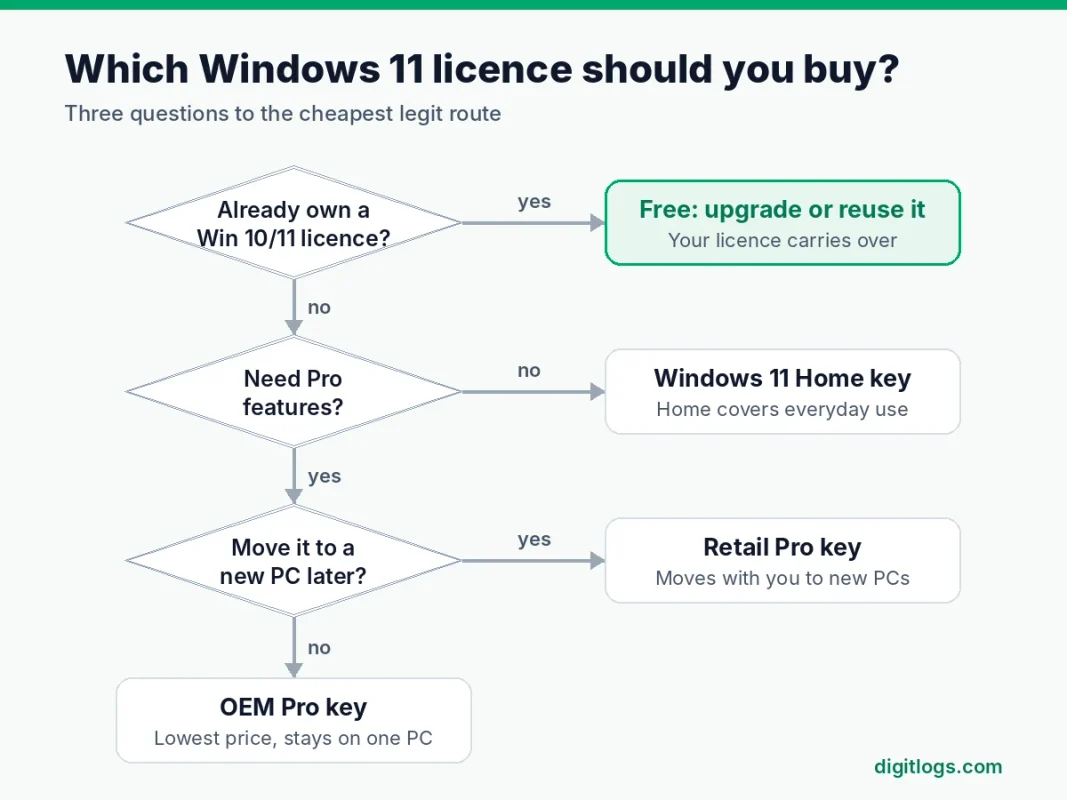
If you already own a licence, use it before paying anything. If you don’t need BitLocker, Remote Desktop or Hyper-V, Home is enough. And if you’re buying Pro, the deciding question is whether the licence needs to outlive this PC: retail if yes, OEM if no.
Running a business with more than ten or so PCs, or needing central device management? Skip the flowchart and look at the business options above.
Frequently asked questions
How much is Windows 11 Pro right now?
On Microsoft’s own store it’s about $199.99 in the US and £219.99 in the UK. Upgrading an activated Home PC to Pro inside Windows costs about $99.99 / £119.99. Licence resellers typically charge $15–40 for a Pro key. Prices vary by region, so check in your own currency.
Is Windows 11 free to upgrade from Windows 10 in 2026?
Yes. If your PC meets Windows 11’s requirements, the upgrade from a genuine Windows 10 licence is still free through Windows Update. Home moves to Home and Pro moves to Pro. Run PC Health Check first to confirm your PC qualifies.
Can I get Windows 11 Pro for free legally?
Yes, in a few situations: upgrading from Windows 10 Pro, reusing a retail Pro key from a PC you no longer use, or getting Windows 11 Education through your school. You can also install Pro and run it unactivated, though you’ll have a watermark and locked personalisation.
Why is a Windows 11 key so cheap on some sites?
Most genuine cheap keys are OEM or surplus retail licences bought in bulk, so resellers skip Microsoft’s retail margin. The very cheapest are often leaked volume keys that Microsoft later blocks. Buy from a registered seller with a written replacement policy.
Is a $20 Windows 11 Pro key legit?
It can be. At that price you’re usually buying an OEM key, which is genuine but tied to the first PC it activates. Check that the seller is a registered company, offers a replacement if activation fails, and delivers keys that activate online.
What’s cheaper: Microsoft’s Home to Pro upgrade or a new Pro key?
A Pro key from a reputable licence seller is usually much cheaper than Microsoft’s in-Settings upgrade, and you enter it on the same Activation screen. Microsoft’s upgrade is the simplest option if you’d rather pay more and buy directly.
How much is Windows 11 in India and the UK?
In the UK, Microsoft lists Home at £119.99 and Pro at £219.99. In India, retail shops commonly list Pro at around ₹14,000–16,000 and Home at around ₹8,000–9,500. Licence resellers in both countries sell for much less.
Is it illegal to use Windows 11 without activating it?
Installing and running Windows 11 unactivated isn’t something Microsoft blocks, and it keeps getting updates. But it isn’t a licensed copy, so it’s not appropriate for business or client work, and Microsoft won’t provide support.
Do Windows 11 prices drop on Black Friday?
Microsoft’s own store price rarely changes. Retailers and licence sellers often run discounts around Black Friday and other sales, so that’s a good time to buy a key if you can wait.
Can a business use a cheap Windows 11 key?
Yes, as long as it’s a genuine licence and you keep the invoice. For a small team, per-PC Pro keys are often the most cost-effective option. Keep a simple register of which key is on which PC in case you’re ever asked for proof.
The bottom line
The Windows 11 price you pay depends more on where you start than on where you shop:
- Already own a Windows 10 or 11 licence? Use it. Upgrading or reusing a retail key costs nothing.
- Need a new licence? A genuine key from a registered licence seller is the cheapest safe option, usually a fraction of Microsoft’s price.
- Want the simplest purchase and don’t mind paying for it? Buy directly from Microsoft.
- Tempted by “free Windows 11 Pro” tools? Don’t. They cost more in malware risk and broken updates than a real key does.
Already bought a key and need help activating it, or upgrading from Home? Our Windows 11 Pro key guide covers every step and the common activation errors.