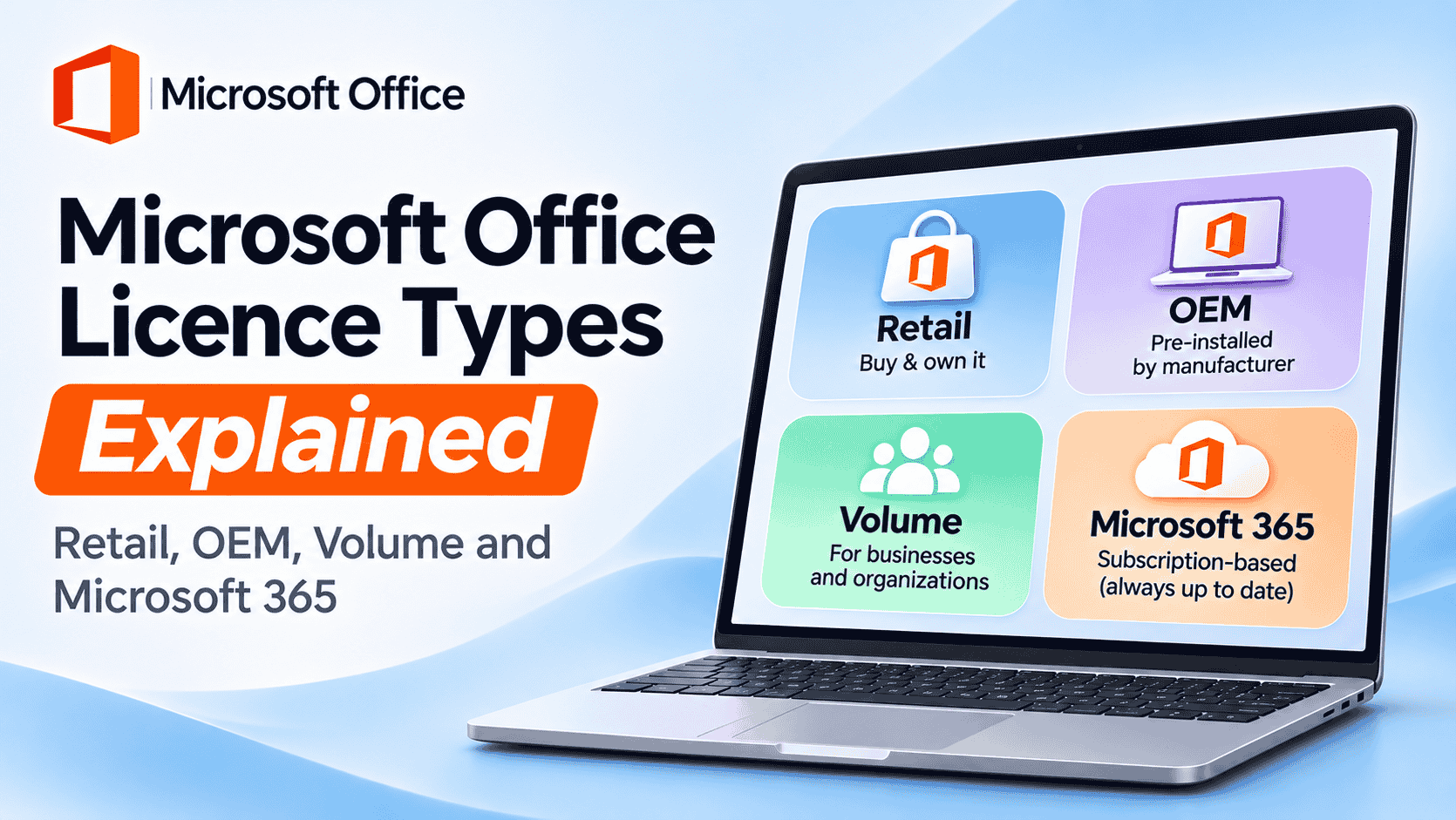
Most people only discover their Office licence type when something goes wrong. They buy a new laptop, try to reinstall Word, and Office says the key has already been used. Or a cheap “Professional Plus” key activates today and stops working six months later.
Both problems come down to the same thing: not knowing what kind of licence you bought. This guide explains every Microsoft Office licence type in plain English, shows you how to check the one on your PC in about two minutes, and helps you pick the right one before you pay.
Quick answer
- There are four Microsoft Office licence types: Retail, OEM, Volume (MAK or KMS) and Microsoft 365 subscriptions.
- The licence type decides whether you can move Office to a new PC and whether you pay once or every year. The edition decides which apps you get, and the version decides how long Microsoft supports it.
- Office 2016 and 2019 lost support on 14 October 2025, and Office 2021 on 13 October 2026. Office 2024 is supported until 9 October 2029.
In this guide
Licence type, edition and version are three different things
Product names like “Office Home & Business 2024” squeeze three separate facts into one line. Untangling them is the quickest way to make sense of every Office listing you’ll ever see.
Licence type
How it’s sold, and what you’re allowed to do with it
Edition
Which apps you get, and whether business use is allowed
Version
Which release, and until when Microsoft fixes security holes
Here’s why it matters. Two listings can both say “Office 2024 Professional Plus” and still be completely different purchases, because the licence type behind them is different. The apps are identical; the rules are not.
Windows works the same way. If you’ve read our guide to the Windows 11 Pro key, the retail-versus-OEM idea below will feel familiar.
The four Microsoft Office licence types
Retail
Home users, freelancers
- Devices
- 1 PC or Mac
- Move to a new PC?
- Yes
- Payment
- Once
- Expires?
- No (support ends with the version)
OEM
Comes with a new PC
- Devices
- The PC it shipped with
- Move to a new PC?
- No
- Payment
- Included in the PC price
- Expires?
- No, but dies with the PC
Volume (MAK / KMS)
Companies, schools, public bodies
- Devices
- Many, under one agreement
- Move to a new PC?
- Within the organisation
- Payment
- Once, per seat
- Expires?
- KMS must renew every 180 days
Microsoft 365
Anyone with several devices
- Devices
- Signed in on 5 at once (per person)
- Move to a new PC?
- Yes, sign in and out
- Payment
- Monthly or yearly
- Expires?
- Read-only if you stop paying
Retail licence (FPP)
A retail licence, sometimes called FPP (Full Packaged Product), is what you get from the Microsoft Store, Amazon or a high-street shop. You pay once and it’s linked to your Microsoft account, so you can see it at account.microsoft.com.
Its big advantage is freedom. A retail Office licence works on one PC or Mac at a time, but you can move it when you replace that machine. Right now Microsoft sells two retail editions: Office Home 2024 ($149.99) and Office Home & Business 2024 ($249.99).
OEM licence
OEM stands for Original Equipment Manufacturer. It’s the licence a PC maker installs before the laptop leaves the factory. It’s genuine and fully featured, but it’s tied to the first device it activates on.
Picture a Dell laptop that shipped with Office Home & Student. Four years later the motherboard fails, the repair shop fits a new one, and Office refuses to reactivate: as far as Microsoft is concerned, that’s a new PC. OEM licences are cheap precisely because they live and die with one machine. Note that Office for Mac has no OEM version at all.
Volume licence (MAK and KMS)
Volume licences are made for organisations that need Office on dozens or thousands of PCs. One agreement covers every seat, and IT installs the same build everywhere. Office LTSC 2024 Standard and Professional Plus are sold this way, and they activate in one of two ways:
- MAK (Multiple Activation Key): one key with a set number of activations. Each PC activates once online with Microsoft and stays activated.
- KMS (Key Management Service): PCs activate against the company’s own KMS server and must check in again at least every 180 days. Take the laptop away from that network for good, and activation eventually lapses.
That KMS detail explains a common complaint. If a “lifetime” key needed a small activator program and Office stopped working months later, it was almost certainly KMS activation pointed at someone else’s server.
Microsoft 365 subscription
Microsoft 365 (formerly Office 365) is a subscription tied to your Microsoft account, not to a device. You always get the latest apps and 1 TB of OneDrive storage per person. Stop paying and the apps drop to read-only: you can open your files but not edit them.
Current US prices are $99.99 a year for Personal, $129.99 for Family (up to six people) and $199.99 for Premium. Microsoft also offers cheaper “Classic” plans without Copilot AI, at $69.99 (Personal) and $99.99 (Family) a year.
What happens when you change PC? Transfer rules by licence type
This is the question that matters most, and the one most product listings skip. Here’s what happens in the four situations people actually run into.
| Situation | Retail | OEM | Volume | Microsoft 365 |
|---|---|---|---|---|
| Reinstall Windows on the same PC | Yes, sign in and reinstall | Yes | Yes, IT re-activates | Yes, sign in |
| Buy a new PC | Yes, remove from old PC first | No, buy again | Company decides | Yes, sign in on the new PC |
| Replace the motherboard | Yes, may need phone activation | Usually no | Company decides | Yes |
| Sell or give away the old PC | Remove Office first and keep the licence | Goes with the PC | No, belongs to the company | Sign out first |
To move a retail licence, uninstall Office from the old PC, then go to account.microsoft.com › Services & subscriptions on the new one and click Install. If activation fails after a hardware change, the phone activation option in Office’s activation wizard usually sorts it out in a few minutes.
Which Office versions are still supported (November 2026)
Support decides whether Microsoft still patches security holes. An unsupported Office still opens your documents, but every new vulnerability found from now on stays open for good. That’s a real risk for anything that touches email or downloaded files.
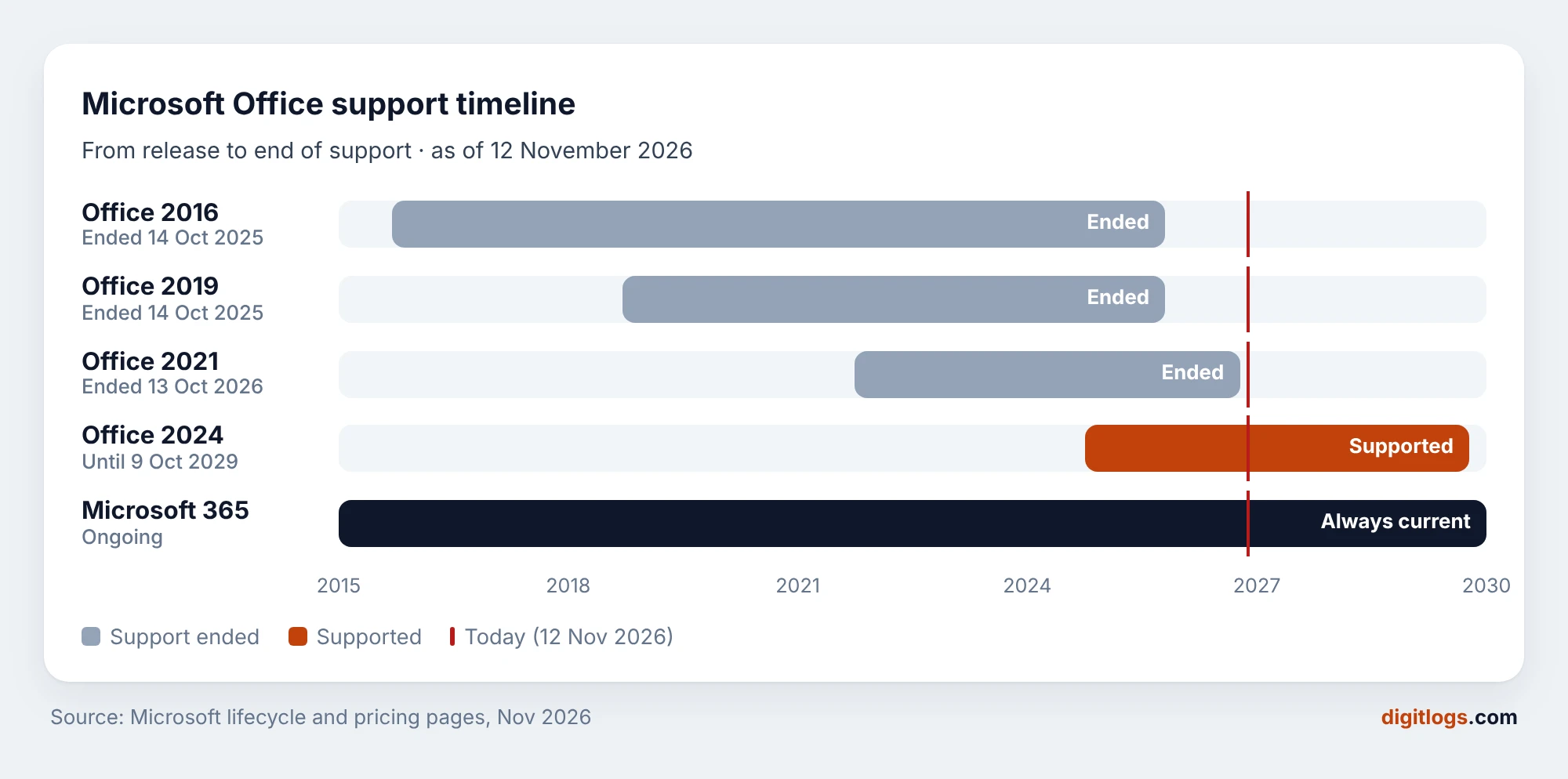
Office 2021 is the one that catches people out. Its support ended on 13 October 2026, as Microsoft confirmed in its Office 2021 end-of-support announcement. Many “best Office licence” articles still recommend it.
Does that make older versions useless? Not quite. A PC that’s offline, or only used to open old spreadsheets, can run Office 2021 Professional Plus for years without trouble. For anything that sends email or opens attachments from strangers, buy Office 2024 or Microsoft 365.
Office editions compared: Home, Home & Business, Standard, Professional Plus
Once the licence type is settled, the edition decides which apps you get. Here’s what’s inside the current 2024 line-up.
| App / right | Home 2024 | Home & Business 2024 | LTSC Standard 2024 | LTSC Professional Plus 2024 |
|---|---|---|---|---|
| Word, Excel, PowerPoint, OneNote | Yes | Yes | Yes | Yes |
| Outlook | No | Yes | Yes | Yes |
| Access (databases) | No | No | No | Yes |
| Business use allowed | No | Yes | Yes | Yes |
| How it’s sold | Retail | Retail | Volume | Volume |
Two details are easy to miss. First, Publisher is gone: Microsoft retired it in October 2026 and left it out of Office 2024. Second, Office Home 2024 is licensed for personal use only, so a freelancer billing clients technically needs Home & Business.
On a Mac, the choice is simpler. Office 2024 Home & Business for Mac gives you Word, Excel, PowerPoint, OneNote and Outlook. Access has never been made for macOS.
How to check which Office licence you have
Word’s own File › Account screen shows your edition and whether it’s activated, but not the licence type. For that, you need a script Office installs on every Windows PC. It sounds technical; it takes two minutes.
- Press Win + S, type cmd, then choose Run as administrator.
- Type
cd "C:\Program Files\Microsoft Office\Office16"and press Enter. If you get “path not found”, you have 32-bit Office: useC:\Program Files (x86)\Microsoft Office\Office16instead. Office 2019, 2021 and 2024 all use the Office16 folder. - Type
cscript ospp.vbs /dstatusand press Enter. - Read the LICENSE NAME and LICENSE DESCRIPTION lines.
Microsoft Windows [Version 10.0.26200.6899]
(c) Microsoft Corporation. All rights reserved.

C:\Windows\System32>cd "C:\Program Files\Microsoft Office\Office16"

1C:\Program Files\Microsoft Office\Office16>cscript ospp.vbs /dstatus
Microsoft (R) Windows Script Host Version 5.812
Copyright (C) Microsoft Corporation. All rights reserved.

---Processing--------------------------
---------------------------------------
PRODUCT ID: 00485-40000-00000-AA582
SKU ID: 8d368fc1-9470-4be2-8d66-90e836cbb051
2LICENSE NAME: Office 24, Office24ProPlus2024VL_MAK_AE edition
3LICENSE DESCRIPTION: Office 24, VOLUME_MAK channel
BETA EXPIRATION: 01/01/1601
4LICENSE STATUS:  ---LICENSED---
5Last 5 characters of installed product key: 7KQ4B
---------------------------------------
---------------------------------------
---Exiting-----------------------------

C:\Program Files\Microsoft Office\Office16>
- 1The command. Run it from the Office16 folder in an administrator window.
- 2LICENSE NAME: version (24 = 2024), edition (ProPlus2024) and how it activates (VL_MAK).
- 3LICENSE DESCRIPTION: the channel. This line is your licence type.
- 4LICENSE STATUS: must say —LICENSED—. “OOB_GRACE” means not activated yet.
- 5Last 5 characters of the key. Match them to the key on your invoice.
Now match what you see to this decoder:
| If the output contains… | Licence type | What it means for you |
|---|---|---|
RETAIL channel | Retail | Yours to move to a new PC. |
OEM in the licence name | OEM | Stays with this PC. |
VOLUME_MAK channel | Volume (MAK) | Activated once online; no renewals needed. |
VOLUME_KMSCLIENT channel | Volume (KMS) | Normal on a work PC. On a home PC, it usually means an unofficial activator. |
TIMEBASED_SUB channel or “Subscription” | Microsoft 365 | Works while your subscription is paid. |
RETAIL (Grace) / OOB_GRACE | Not activated | Enter a key or sign in, or Office will lock editing. |
On a Mac, it’s even easier: open Word, click Word › About Microsoft Word, and the licence type is printed under the version number.
Office or Microsoft 365: which costs less over 5 years?
“Subscriptions are a rip-off” and “perpetual licences are outdated” are both half-true. The honest answer depends on how many devices you use and how long you keep them. Here’s the running total at Microsoft’s US list prices:
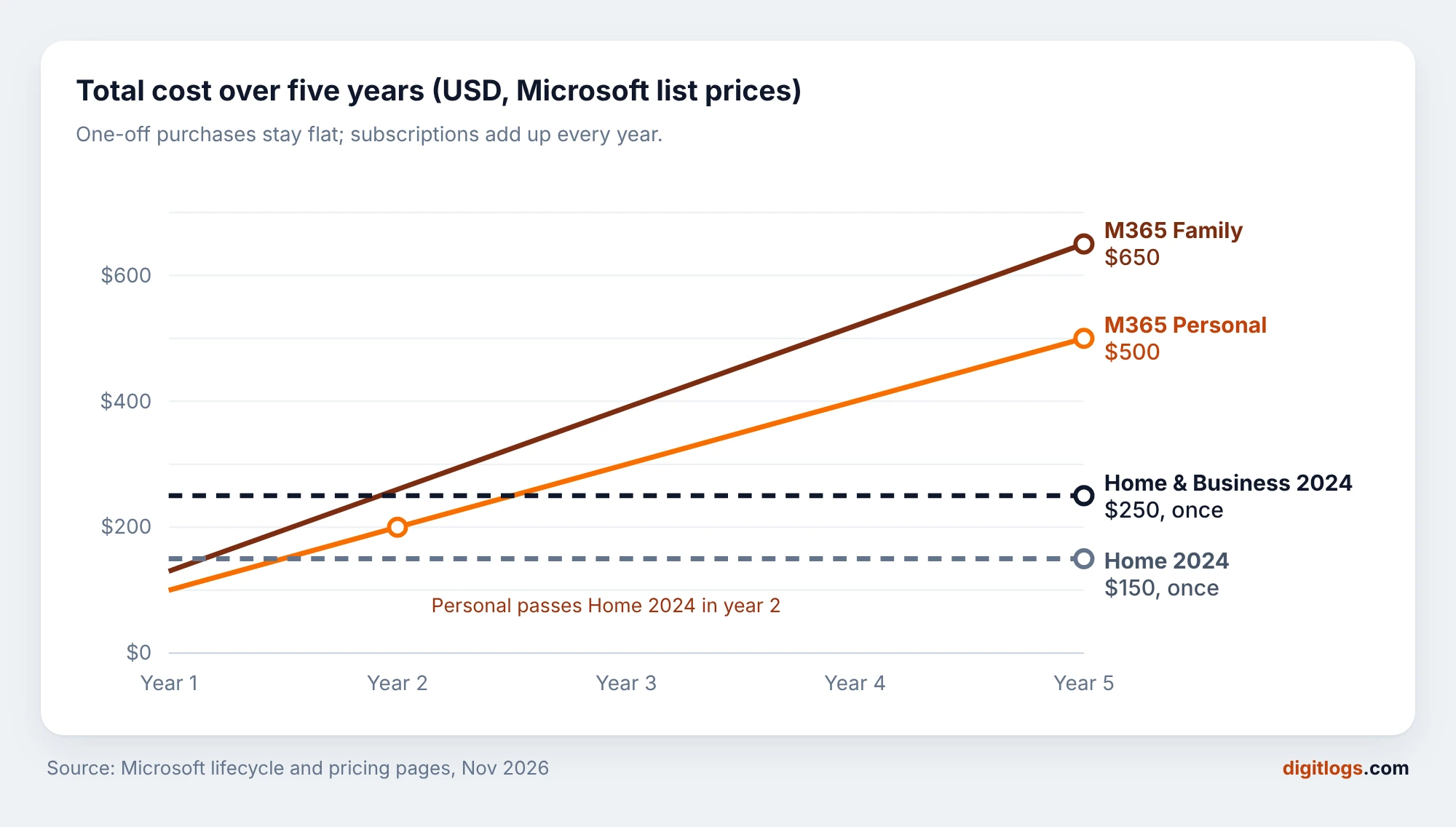
The numbers point to a simple rule. One PC, kept for three years or more, and no need for cloud storage? A perpetual Office 2024 licence wins clearly. Two or more people or devices? Microsoft 365 Family is the better deal, because $129.99 covers six people and each gets 1 TB of OneDrive.
Example: a student who only writes essays on one laptop spends $150 on Office Home 2024 and is done until 2029. A family of four with two laptops, a tablet and four phones would need four separate perpetual licences, and still wouldn’t get Office on the phones.
Office for businesses: volume licensing, CSP and Microsoft 365 Business
Small businesses no longer sign the old Microsoft “Open Licence” agreements. That programme was replaced by CSP (Cloud Solution Provider) partners, who sell both Microsoft 365 subscriptions and perpetual Office LTSC licences.
Microsoft raised its business prices on 1 July 2026. Per user, per month:
| Plan | Price from 1 Jul 2026 | Desktop Office apps? | Best for |
|---|---|---|---|
| Microsoft 365 Business Basic | $7 | No, web and mobile only | Email and Teams on a budget |
| Microsoft 365 Business Standard | $14 | Yes | Most small offices |
| Microsoft 365 Business Premium | $22 | Yes | Firms needing device security |
| Office LTSC 2024 (volume) | One-off, per PC | Yes | Offline or locked-down PCs |
Office LTSC 2024 makes most sense where PCs must stay unchanged for years: a factory floor terminal, a lab instrument PC, or a reception desk that never needs new features. For a typical five-person office, Business Standard is simpler to run.
How to choose the right Office licence (and avoid the wrong one)
1.Do two or more people or devices need Office?
2.Will you use it for paid work, or need Outlook?
3.Do you need Access databases?
4.Will you replace this PC within three years?
Whichever you choose, run through this checklist before paying. It takes 30 seconds and prevents almost every licence problem we hear about.
- The licence type is stated before you buy: retail, OEM, volume or subscription. “Lifetime” alone tells you nothing.
- The version is still supported: in November 2026, that means Office 2024 or Microsoft 365.
- You get an invoice with the product name and key. Every Digitlogs order includes one, emailed with the key.
- Activation is explained: online, by phone, or by signing in. Be wary of anything that needs extra software to activate.
- The edition matches your use: Home for personal use, Home & Business or higher for work.
Office 2024 Professional Plus
Licence type: [confirm on product page]
Word, Excel, PowerPoint, Outlook, OneNote and Access. Supported until October 2029.
View Office 2024 Pro PlusOffice 2024 Home & Business for Mac
Licence type: [confirm on product page]
Word, Excel, PowerPoint, OneNote and Outlook for one Mac, business use allowed.
View Office 2024 for MacAll Microsoft Office keys
Compare every edition and version
Office 2016 to 2024 for Windows and Mac, with the licence type shown on each product.
Browse Office keysFrequently asked questions
What are the different types of Microsoft Office licences?
There are four: Retail (bought once, moveable to a new PC), OEM (pre-installed and tied to one PC), Volume (sold to organisations, activated by MAK or KMS) and Microsoft 365 (a subscription tied to your Microsoft account). The licence type is separate from the edition and the version.
What is the difference between a retail and an OEM Office licence?
Both are genuine and include the same apps. A retail licence can be moved to a new computer once you remove it from the old one. An OEM licence is tied to the first PC it activates on and can’t be transferred, which is why it’s cheaper.
Is an OEM or volume Office licence genuine?
Yes, both activate through Microsoft and run the same apps. They come with different terms: OEM licences belong to one device, and volume licences are issued to organisations under a Microsoft agreement. Check what the seller says about the licence type before you buy.
Can I transfer my Office licence to a new computer?
Retail licences and Microsoft 365 subscriptions can move to a new computer. Uninstall Office from the old PC, then install it from account.microsoft.com on the new one. OEM licences cannot be transferred, and volume licences stay with the organisation that owns them.
What happens to Office 2021 now that support has ended?
Office 2021 keeps working and opens your files as before, but since 13 October 2026 it gets no security updates or fixes. It’s fine on an offline PC; for email and downloaded files, Office 2024 (supported until 9 October 2029) or Microsoft 365 is safer.
Is Office 2024 Professional Plus available as a retail licence?
Microsoft sells Professional Plus 2024 as Office LTSC Professional Plus 2024 through volume licensing, activated by MAK or KMS. The retail 2024 editions sold to consumers are Office Home 2024 and Office Home & Business 2024.
Is Microsoft 365 cheaper than buying Office once?
For one person on one PC, no: Office Home 2024 costs $149.99 once, while Microsoft 365 Personal costs $99.99 every year and passes that total in year two. For a family or several devices, Microsoft 365 Family at $129.99 a year for six people is usually cheaper.
How do I find out which Office licence I have?
Open Command Prompt as administrator, go to C:\Program Files\Microsoft Office\Office16 and run cscript ospp.vbs /dstatus. The LICENSE DESCRIPTION line shows RETAIL, VOLUME_MAK, VOLUME_KMSCLIENT or a subscription channel. On a Mac, use Word › About Microsoft Word.
Still unsure which Microsoft Office licence type fits you? Start from the version: in late 2026, that means Office 2024 or Microsoft 365. Then pick the licence type that matches how long you’ll keep your PC.