
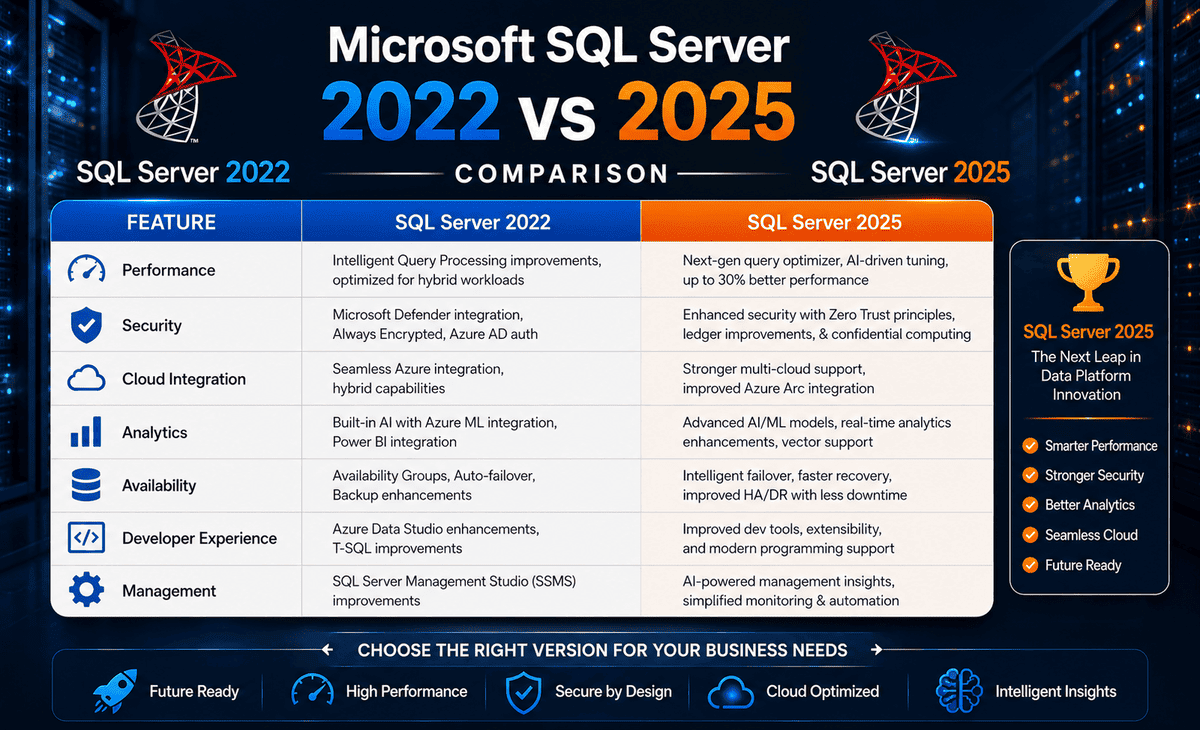
If you are currently evaluating Microsoft SQL Server 2022 against the newer Microsoft SQL Server 2025, you have come to the right place. This comparison guide is designed specifically for beginners, systems administrators, and IT managers. We will break down complex database jargon into simple, actionable terms, helping you make the most informed decision for your infrastructure.
Table of Contents
The Core Problem: Why Version Selection Matters More Than Ever
In the past, database updates were simple speed boosts. A new version meant your queries ran slightly faster, and you could store more records. Today, the landscape is vastly different. Modern applications are expected to process complex artificial intelligence (AI) workloads, run real-time unstructured data analytics, work natively with API integrations, and remain completely safe from cyber threats.
If you choose the wrong database version, you might run into several common roadblocks:
- The AI Capability Gap: Standard relational databases are not naturally designed to handle the vector embeddings used by Large Language Models (LLMs) like ChatGPT or Claude. If you choose an older platform, you have to build complex external pipelines to manage vector searches.
- Compatibility Bottlenecks: Newer server operating systems like Windows Server 2025 are designed with modern hyper-threading, advanced security models, and high-performance storage in mind. An outdated database engine cannot take full advantage of these OS-level optimizations.
- Unnecessary Administrative Overhead: Older systems lack self-tuning capabilities, requiring database administrators (DBAs) to spend hours manually identifying performance regressions and resolving query planning bugs.
- Modern Developer Friction: Developers today work heavily with JSON, Regular Expressions (RegEx), and third-party APIs. Forcing them to write clunky workarounds inside legacy T-SQL environments kills productivity.
Let’s look at how Microsoft addresses these pain points across its two latest flagship database releases.
Introducing Microsoft SQL Server 2022
Released in late 2022, SQL Server 2022 (codenamed “Dallas”) was heavily marketed as the “hybrid cloud database.” It bridged the gap between traditional on-premises hardware and Microsoft’s Azure cloud.
Key Highlights of SQL Server 2022:
- Parameter Sensitive Plan (PSP) Optimization: This feature automatically solved “parameter sniffing,” a classic database headache where a query plan designed for one parameter would cause massive performance drops when run with a different parameter.
- SQL Server Ledger: This built-in blockchain-like feature allows you to create tamper-proof tables. It is ideal for financial systems or security logs where proving data integrity is critical.
- Azure Synapse Link: This allows you to stream near-real-time analytical data directly from your operational SQL Server to Azure cloud analytics without slowing down your live databases.
Introducing Microsoft SQL Server 2025
Microsoft SQL Server 2025 is the “AI-Ready” evolution of Microsoft’s database platform. Building upon the secure hybrid-cloud foundation of 2022, the 2025 release turns your database engine into an active participant in modern AI development.
Major Upgrades in SQL Server 2025:
- Native Vector Support: SQL Server 2025 introduces native vector data types, vector indices, and similarity-search functions (using binary formats). You can store and search AI embeddings directly inside your SQL tables without external tools.
- Native JSON Data Type: While SQL Server 2022 supports JSON via string-parsing, SQL Server 2025 introduces a true, highly optimized native JSON data type, significantly improving processing speeds and index efficiency.
- Built-in Regular Expressions (RegEx): Developers no longer have to write complex custom assembly code (CLR) or nested string-manipulation functions just to do basic string matching.
- Standard Edition Boosts: For SQL Server 2025 Standard, Microsoft increased physical performance limits. Additionally, the highly coveted Resource Governor tool previously reserved exclusively for the premium Enterprise tier is now available to Standard users.
- Massive Express Edition Expansion: For small-scale projects, the free SQL Server 2025 Express edition increases the maximum database size from a tight 10 GB to a generous 50 GB, alongside out-of-the-box Full-Text Search.
Quick Comparison Table
| Feature Category | SQL Server 2022 | SQL Server 2025 | Why It Matters for Beginners |
|---|---|---|---|
| Primary Focus | Hybrid Cloud Connectivity & Ledger | AI Enablement, Native Developer Tools | Shift from standard storage to intelligent processing. |
| AI / Machine Learning | Basic external integrations (R, Python) | Native Vector Storage, Indices, & Search | Allows semantic search and LLM integrations directly in T-SQL. |
| JSON Support | Parsed as plain text strings (NVARCHAR) | Native JSON Data Type & Aggregating | Much faster data processing for modern web apps. |
| Query Tuning | Manual Intelligent Query Processing (IQP) | Enhanced Auto Plan Correction (Default) | The database fixes its own slow queries without manual work. |
| Standard Edition Limits | Up to 24 cores / 128 GB memory | Up to 32 cores / 256 GB memory | Better hardware utilization without paying for Enterprise licenses. |
| Resource Governor | Enterprise Edition Only | Standard & Enterprise Editions | Allows you to control CPU/memory allocation to prevent slow queries. |
| Free Express Size Limit | 10 GB per database | 50 GB per database | A huge upgrade for small businesses and testing setups. |
| Text Manipulation | Custom T-SQL, LIKE, and SUBSTRING | Native RegEx (Regular Expressions) | Easier data cleanup and modern string validation. |
Step-by-Step Solution: How to Choose and Install Your Version
If you are currently setting up a new server environment, particularly on the modern Windows Server 2025 Standard operating system, here is a clear, step-by-step path to decide which version to use and how to install it.
Step 1: Analyze Your Workload Requirements
- Choose SQL Server 2022 if: Your applications are legacy, you do not use JSON heavily, you do not have any upcoming AI or vector search requirements, and you require an older, mature operating system compatibility matrix.
- Choose SQL Server 2025 if: You are deploying a brand new infrastructure on Windows Server 2025 Standard, you plan to integrate AI embeddings or LLMs, you want to build modern web APIs using JSON, or you want to maximize your hardware performance on a Standard license.
Step 2: Download Your Selected Installation Media
To begin, you will need to get the correct installation media. Depending on your licensing and budget, choose one of these options:
- Evaluation Edition (Free 180-Day Trial): If you want to test-drive features before committing, search for the official SQL Server 2025 Download or SQL Server 2025 Enterprise download on the Microsoft Evaluation Center.
- Developer Edition (Free for Non-Production): If you are an individual developer, you can obtain a full-featured, free version of SQL Server 2022 or 2025 for building and testing applications.
- Express Edition (Free for Small-scale Production): Great for databases up to 50 GB (in 2025). Look for Windows server 2025 Standard SQL Server free download options on Microsoft’s SQL Server downloads portal.
- Volume Licensing (Standard / Enterprise): If you are an enterprise, obtain your installation files directly from your Microsoft Volume Licensing Service Center (VLSC).
Step 3: Run the Installation Wizard
Once you have the installer executable, follow these guidelines to complete the setup:
- Mount or Extract the ISO: Right-click the downloaded file and select Mount. Run
setup.exeas an administrator. - Launch the Installation Center: In the left sidebar, click on Installation, and then click on New SQL Server stand-alone installation or add features to an existing installation.
- Enter License Key: Choose your product key tier (Evaluation, Developer, Express, or enter your purchased Standard/Enterprise license).
- Feature Selection: Ensure you select the Database Engine Services. If installing SQL Server 2025, check the boxes for any vector extensions or developer tools you wish to activate.
- Server Configuration: Keep the service accounts as default, but change the Collation settings if your application requires a specific character set (e.g., case-sensitivity).
- Database Engine Configuration: * Authentication Mode: Always select Mixed Mode so you can log in using Windows authentication or a custom password-protected System Administrator (
sa) account.- Data Directories: Set up dedicated high-speed SSD drives for your user databases, transaction logs, and
tempdbto prevent disk performance bottlenecks.
- Data Directories: Set up dedicated high-speed SSD drives for your user databases, transaction logs, and
- Complete and Restart: Once the installation finishes successfully, restart your server to apply all kernel configurations.
Practical Tips for Database Upgrades & Administration
Upgrading databases can be nerve-wracking. Here are some essential tips to keep your migration safe and seamless:
- Leverage the Database Compatibility Level: When upgrading from SQL Server 2022 (or older) to SQL Server 2025, your database will keep its original compatibility level. To unlock all the new query optimizer enhancements, remember to manually update the compatibility level via SSMS (SQL Server Management Studio):
ALTER DATABASE YourDatabaseName SET COMPATIBILITY_LEVEL = 170; -- 170 is SQL Server 2025 - Benchmark Your Queries First: Before executing a full-scale production migration, run a workload trace. Compare query performance using the Query Store feature to verify that execution plans remain stable.
- Avoid the “Third-Party Download” Trap: When looking for Windows server 2025 standard sql server free options, always download directly from official Microsoft domains. Unofficial sources or cracked versions found on online forums can contain deep-level backdoors, ransomware, or keyloggers.
- Take Advantage of Resource Governor in Standard: If you upgrade to SQL Server 2025 Standard, immediately configure Resource Governor resource pools. This prevents a single poorly-written analytical query from consuming 100% of your server’s CPU and crashing your primary line-of-business app.
Frequently Asked Questions (FAQ)
1. Is SQL Server 2025 fully compatible with Windows Server 2025 Standard?
Yes. SQL Server 2025 is optimized out of the box to run flawlessly on Windows Server 2025 Standard. The database engine leverages the operating system’s modern kernel, scheduling, and security models to deliver highly efficient thread execution and secure cryptographic standards.
2. Can I get a free download of SQL Server 2025 for my production website?
Yes, you can use SQL Server 2025 Express for production environments completely free of charge. Microsoft has dramatically upgraded this edition, raising the maximum database storage limit to 50 GB (up from 10 GB in SQL Server 2022 and older versions). This makes it highly viable for small businesses, web apps, and utility microservices.
3. What do developers on Reddit say about running SQL Server on Windows Server 2025?
If you search through topics like Windows Server 2025 standard SQL Server Reddit, you will find that developers are highly enthusiastic about the performance of this combination. Reddit users highlight the dramatic performance improvements of native JSON storage over plain-text NVARCHAR and praise Microsoft for introducing native RegEx support, which replaces outdated custom code libraries.
4. What is the main difference in licensing limits between SQL Server 2022 and 2025 Standard?
SQL Server 2022 Standard is capped at the lesser of 4 sockets or 24 cores and 128 GB of buffer pool memory. SQL Server 2025 Standard increases these capacity limits, supporting up to the lesser of 4 sockets or 32 cores and 256 GB of memory per instance.
5. Do I need to buy a new license to upgrade from SQL Server 2022 to 2025?
If you have an active Microsoft Software Assurance (SA) agreement or are utilizing a cloud-based pay-as-you-go subscription models (often managed via Azure Arc), you are entitled to upgrade to SQL Server 2025 without purchasing a new license. Otherwise, a new license will need to be purchased through an authorized Microsoft reseller.
Conclusion: Making the Smart Decision
In the battle of Microsoft SQL Server 2022 vs 2025, your choice ultimately boils down to what you are building and where you are running it.
- Choose SQL Server 2022 if your software vendor does not yet support the 2025 engine, or if you are running a legacy system that does not require AI features, native JSON processing, or standard-tier resource governance.
- Choose SQL Server 2025 if you want to future-proof your tech stack, develop modern applications with native JSON and AI capabilities, or maximize the performance of your hardware investments on a Standard license.
Pairing SQL Server 2025 with the robust security and architecture of Windows Server 2025 Standard creates an incredibly fast, secure, and modern environment designed to last for years to come.









